Connecting SQL Server Management Studio Express To a SQL Server in SQL Server
How to connect SQL Server Management Studio Express to SQL Server 2005 Express in SQL Server?
✍: FYIcenter.com

Once you have SQL Server 2005 Express installed and running on your local machine, you are ready to connect SQL Server Management Studio Express to the server:
Click Start > Programs > Microsoft SQL Server 2005 > SQL Server Management Studio Express to launch SQL Server Management Studio Express.
The "Connect to Server" box shows up. The Server Name field has a default value of "LOCALHOST\SQLEXPRESS". So don't change it. Select "SQL Server Authentication" as the Authentication. Enter enter "sa" as the Login, and "FYIcenter" as the Password.
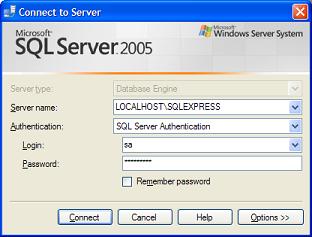
Click the Connect button, you should see the SQL Server Management Studio Express window comes up.
⇒ Running Queries with SQL Server Management Studio Express in SQL Server
⇐ Downloading and Installing SQL Server Management Studio Express in SQL Server
⇑ Downloading and Installing SQL Server 2005 Express Edition
2016-12-04, 6461🔥, 0💬
Related Topics:
