Running SQL Server 2005 Books Online on Your Local System in SQL Server
How to run SQL Server 2005 Books Online on your local system in SQL Server?
✍: FYIcenter.com

SQL Server 2005 Books Online can be accessed by a Web browser over the Internet. But you can also download it and read it on your local system. If you have downloaded and installed SQL Server 2005 Books Online package, you follow this tutorial to run it:
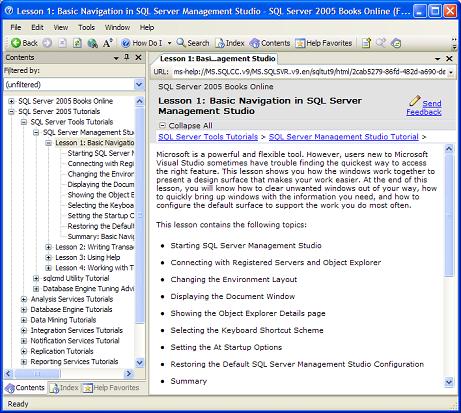
1. Click Start > Programs > Microsoft SQL Server 2005 > Documentation and Tutorials > Tutorials > SQL Server Tutorials. The SQL Server 2005 Books Online window shows up.
2. Click the plus sign (+) next to "SQL Server 2005 Tutorials in the Contents window".
3. Click the plus sign (+) next to "SQL Server Tools Tutorials".
4. Click "Lesson 1: Basic Navigation in SQL Server Management Studio". The book content shows up for you to read.
⇒ Installing Sample Scripts and Databases in SQL Server
⇐ Downloading and Installing SQL Server 2005 Books Online in SQL Server
⇑ Downloading and Installing SQL Server 2005 Express Edition
2016-12-04, 3032🔥, 0💬
