Adding a New DSN with the ODBC Driver for SQL Server
How To Add a New DSN with the ODBC Driver for SQL Server?
✍: Guest
 Assuming that the ODBC driver for SQL Server has been installed as part
of the Windows system, the next step of setting up ODBC connection to SQL Server
is to create a new DSN (Data Source Name) with the ODBC Data Source Administrator:
Assuming that the ODBC driver for SQL Server has been installed as part
of the Windows system, the next step of setting up ODBC connection to SQL Server
is to create a new DSN (Data Source Name) with the ODBC Data Source Administrator:
- Go to Control Panel.
- Go to Administrative Tools.
- Run Data Sources (ODBC). The ODBC Data Source Administrator window shows up.
- Go to System DSN tab.
- Click the Add button.
You should a list of all ODBC drivers installed on your system. SQL Server ODBC driver should be on the list. If you look at the picture below, you will see the SQL Server ODBC driver with version 2000.85.1117.00, file SQLSRV32.DLL, date 8/4/2004:
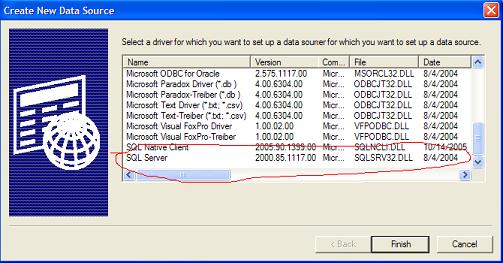
Select "SQL Server" from the ODBC driver list, and click "Finish" button. The "Create a New Data Source to SQL Server" wizard window shows up. Continue with the next tutorial to finish up creating a new DSN.
⇒ Defining the Name and Server for a new DSN
⇐ What Is ODBC (Open Database Communication)?
2024-08-06, 3126🔥, 0💬
Related Topics:
