Providing Login Information for a New ODBC DSN
How To Provide Login Information for a New ODBC DSN?
✍: Guest
 Continue from the previous tutorial. After clicking Next on the first screen of
the "Create a New Data Source to SQL Server" wizard, you should see the second screen
asking you to select SQL Server login type, login name and password.
Continue from the previous tutorial. After clicking Next on the first screen of
the "Create a New Data Source to SQL Server" wizard, you should see the second screen
asking you to select SQL Server login type, login name and password.
Select the radio button on "With SQL Server authentication using a login ID and password entered by the user. Also enter in Login ID field: "sa" and in Password field: "FYIcenter". See the picture below:
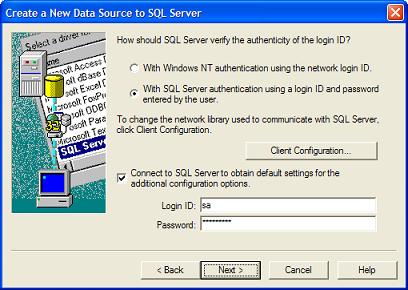
Remember that "sa" is the system administrator login name, you probably should use a less privileged login name here. "FYIcenter" must be the correct password defined in the SQL Server for "sa" login name.
Click Next and continue with the next tutorial to finish up creating a new DSN.
⇒ Getting "Connection failed" Error on ODBC DSN Creation
⇐ Defining the Name and Server for a new DSN
2024-08-06, 2825🔥, 0💬
Related Topics:
