Defining the Name and Server for a new DSN
Q
How To Define the Name and Server for a new DSN?
✍: Guest
A
 Continuing from the previous tutorial, on the first screen
of the "Create a New Data Source to SQL Server" wizard,
you should enter 3 fields: Name, Description, and Server as suggested below:
Continuing from the previous tutorial, on the first screen
of the "Create a New Data Source to SQL Server" wizard,
you should enter 3 fields: Name, Description, and Server as suggested below:
Name: FYI_SQL_SERVER
Description: FYIcenter.com SQL Server
Server: LOCALHOST
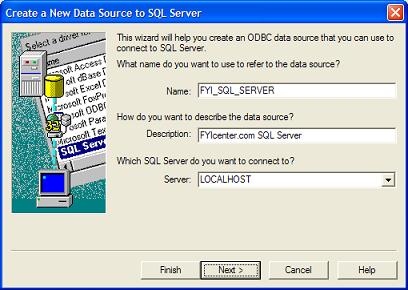
Note that the name and description can be decided by yourself. But the server must be the network machine name where the SQL Server is running. In this example, LOCALHOST is the machine name for your local system.
Click Next and continue with the next tutorial to finish up creating a new DSN.
⇒ Providing Login Information for a New ODBC DSN
⇐ Adding a New DSN with the ODBC Driver for SQL Server
2024-08-06, 2688🔥, 0💬
Related Topics:
